10 Real-World Examples of Healthcare Workflow Automation in 2026
Explore 10 real-world healthcare workflow automation examples that streamline operations, reduce administrative burdens, improve patient experiences, and strengthen revenue cycle performance in 2026.
Published on:
June 11, 2026


Key Takeaways
• Healthcare workflow automation uses software to execute repetitive clinical and administrative tasks without manual handoffs.
• US healthcare avoided an estimated $258 billion in administrative costs in 2024 through automated transactions.
• The highest-ROI automation targets sit in the revenue cycle: eligibility, coding, claim status, and denials.
• AI agents now automate judgment-based work, such as denial root-cause analysis and appeal drafting, that rules alone couldn't handle.
• Start with one high-impact workflow, measure results, and expand once the ROI is proven.
Payers denied 19% of in-network claims submitted to health insurance marketplace plans in 2024, according to KFF.
A significant share of those denials can often be traced back to routine administrative mistakes. Staff enter incorrect codes, overlook documentation requirements, or miss filing deadlines. What starts as a small process error can eventually lead to a denied claim.
Healthcare workflow automation exists to close those gaps by handling repetitive, rule-based tasks automatically. It reduces errors, speeds up workflows, and allows staff to spend less time on administrative work and more time on patient-focused activities.
In this guide, we'll break down what healthcare workflow automation is, explore its key benefits, and walk through 10 real-world use cases across the revenue cycle.
On this page
- What Is Healthcare Workflow Automation?
- Benefits of Automation in Healthcare
- 10 Examples of Automation in Healthcare Workflows
- 1. Patient Intake
- 2. Insurance Eligibility Verification
- 3. Medical Scribing
- 4. Medical Coding
- 5. Clinical Documentation Integrity (CDI) Checks
- 6. Automated Charge Entry Into Billing Software
- 7. Automated Policy Reviews
- 8. Automated Claim Status Checks
- 9. Denial Root-Cause and Pattern Analysis
- 10. Automated Payer-Specific Appeal Letters
- What Should Healthcare Providers Consider Before Implementing Automation?
- Bring End-to-End Workflow Automation to Your Revenue Cycle with CombineHealth
- FAQs
What Is Healthcare Workflow Automation?
Healthcare workflow automation is the use of software to execute repetitive clinical, administrative, and financial tasks, such as patient intake, eligibility checks, coding, and claim follow-up, without manual handoffs between staff and systems.
In practice, it means that when a patient checks in, their insurance is verified automatically. When a physician completes a note, it's reviewed and coded by an AI agent.
And when a payer rejects a claim, an automated system identifies the root cause, drafts an appeal, and flags it for review.
Healthcare workflow automation spans two broad domains:
- Clinical workflows: documentation, scribing, CDI checks, and care coordination
- Administrative and RCM workflows: eligibility checks, charge capture, coding, claims submission, denial management, and payer appeal
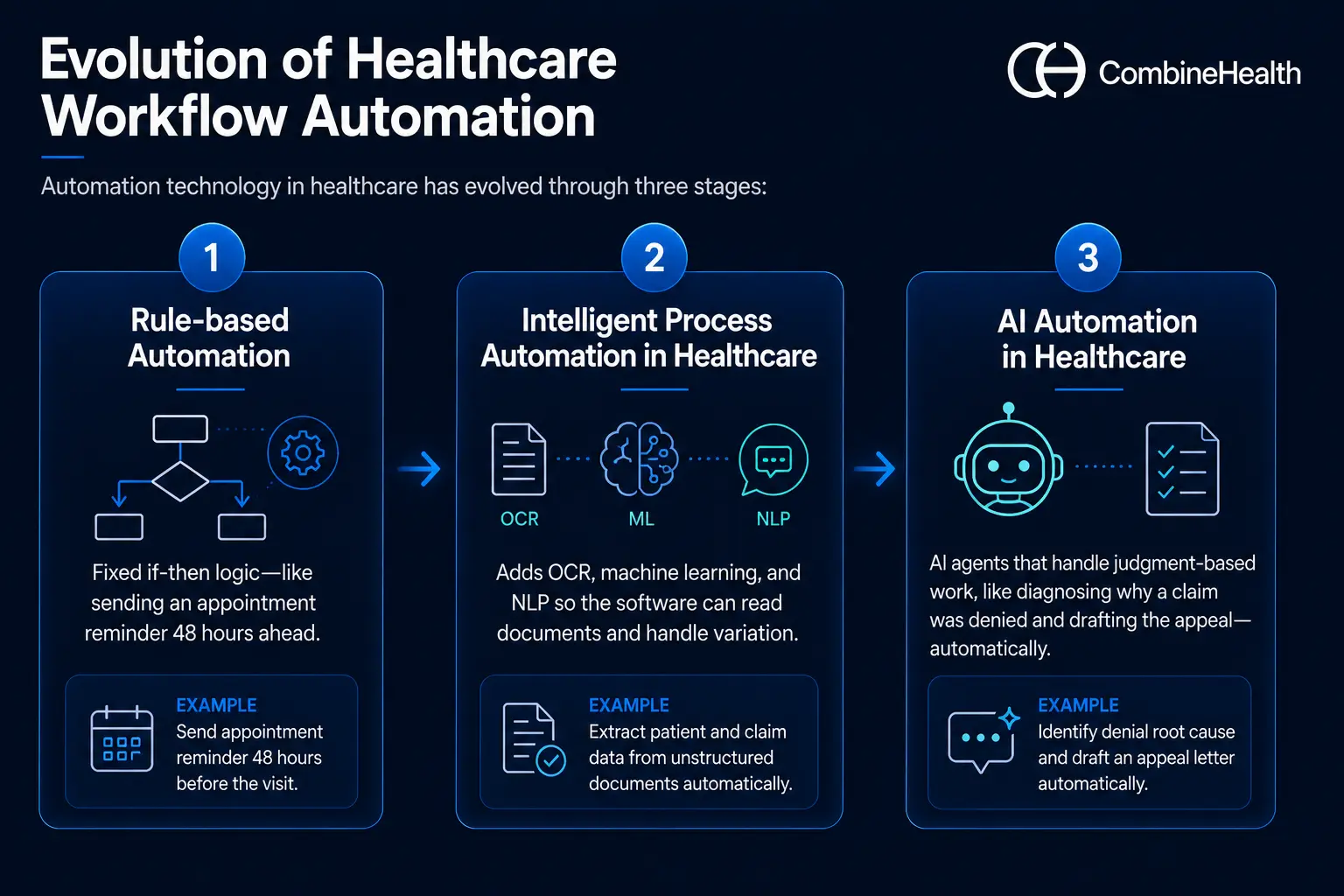
Evolution of Healthcare Workflow Automation
Automation technology in healthcare has evolved through three stages:
- Rule-based automation: fixed if-then logic—like sending an appointment reminder 48 hours ahead.
- Intelligent process automation in healthcare: adds OCR, machine learning, and NLP so the software can read documents and handle variation.
- AI automation in healthcare: AI agents that handle judgment-based work, like diagnosing why a claim was denied and drafting the appeal—automatically.
Benefits of Automation in Healthcare
1. Fewer Errors Across Hospital Workflows
Workflow automation reduces errors by removing manual data entry and standardizing how work gets done.
Information captured once, at registration or in the clinical note, flows to every downstream system without retyping, eliminating the transcription mistakes that cause mismatched records and rejected claims.
Automated validation also catches problems early: missing fields, invalid codes, and eligibility mismatches get flagged before submission. And because every action is logged, the audit trail shows exactly where any issue began.
2. Lower Administrative Costs
Automation lowers administrative costs by replacing manual, transaction-heavy work with electronic processing.
The savings are measurable at a national scale. The 2025 CAQH Index found that US healthcare avoided an estimated $258 billion in administrative costs in 2024 through electronic transactions.
For an individual healthcare organization, those savings show up as fewer denials to rework, faster reimbursement, and staff hours redirected from data entry to higher-value exception handling. Lower cost to collect follows directly.
| Recommended reading: Denial management in healthcare
3. Better patient care
Automation improves patient care indirectly but powerfully: it gives time back to clinical and front-desk staff.
The 2024 CAQH Index estimated that fully automated administrative workflows save an average of 70 minutes per patient visit, time that can be spent on patients instead of paperwork.
Patients also feel the difference directly, through shorter check-in times, accurate cost estimates before service, and fewer surprise bills caused by eligibility or coding errors.
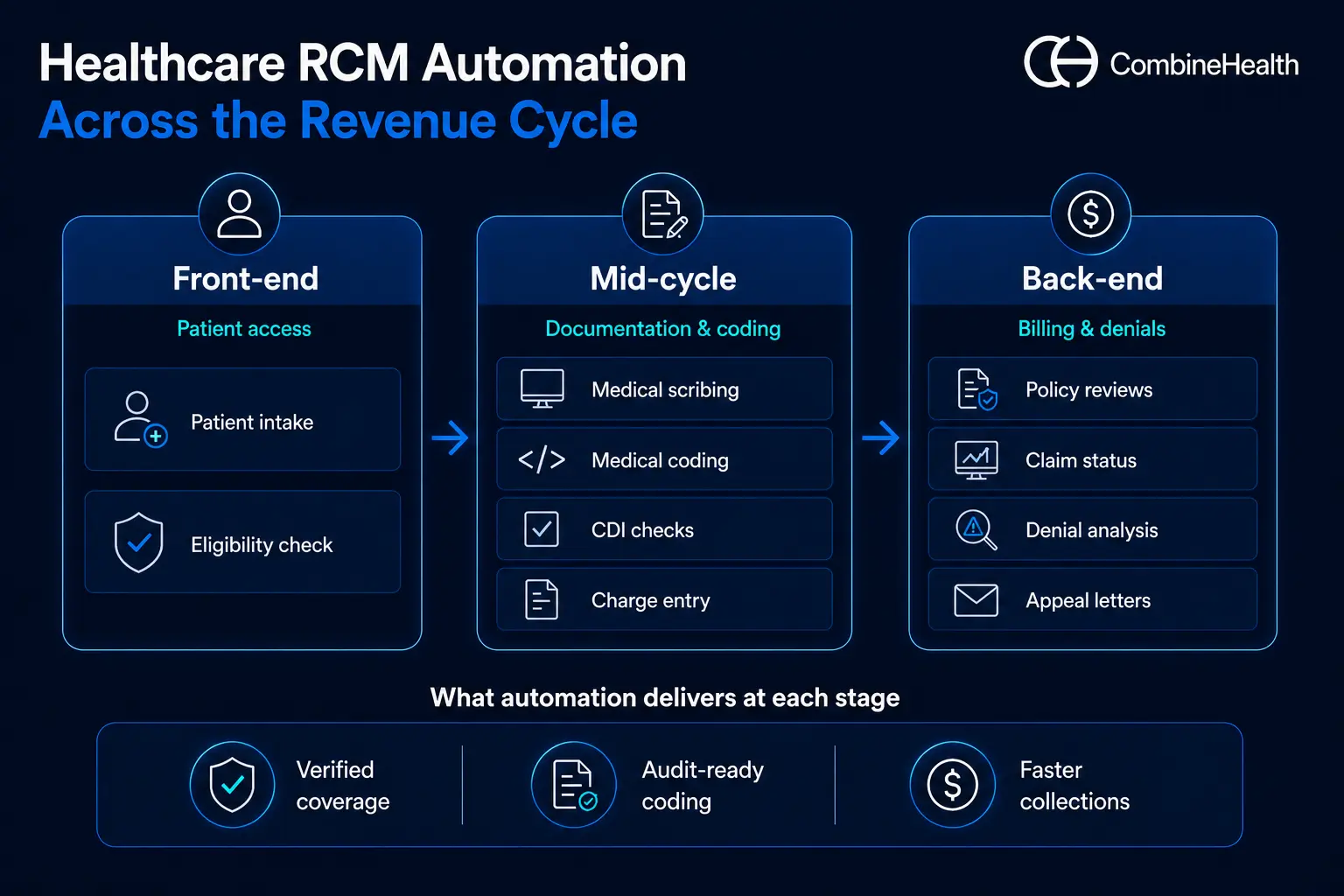
10 Examples of Automation in Healthcare Workflows
These examples of automation in healthcare follow the order of the revenue cycle itself, which is how the dollar actually moves through your organization: from the front door, through documentation and coding, to billing, denials, and appeals.
1. Patient Intake
Patient intake is the process of collecting a patient's demographics, insurance details, and medical history before a visit. It's the first data entry point in the revenue cycle, and every downstream claim depends on it.
Why automate it
Manual patient intake could involve clipboards, illegible handwriting, and staff retyping the same demographics into multiple systems. Every retype is a chance to corrupt the data that every downstream claim depends on.
How patient intake automation works
Patients receive a secure digital link before their visit to complete demographics, medical history, consent forms, and insurance details, and to upload ID and insurance card images. The data is validated automatically and written directly to the EHR and practice management system.
What tools are typically used to automate patient intake
HIPAA-compliant digital form builders, OCR for document capture, and integration middleware that syncs submissions to the EHR in real time.
2. Insurance Eligibility Verification
Eligibility verification is the process of confirming a patient's active coverage and benefits with their payer before service, establishing what's covered and what the patient will owe.
Why automate it
Eligibility errors are among the most common and most preventable causes of denials. Manual verification means logging into payer portals or sitting on hold, often for 10 or more minutes per patient.
How insurance eligibility verification automation works
The moment an appointment is scheduled, the software runs an electronic eligibility check against the payer, confirms active coverage, plan benefits, copays, and deductibles, and flags discrepancies for staff before the visit. Re-checks run automatically closer to the date of service.
What tools are typically used to automate insurance eligibility verification
Real-time eligibility transaction engines, clearinghouse connections, and verification tools that plug into the scheduling system and query payers automatically.
Case Study
A customer was scouring face sheets and logging into dozens of payer portals to retrieve insurance eligibility information for patients.
On top of that, the patient portals don’t make the search easier. Hospitals have to try different combinations of name, date, and insurance ID, and even a small typo can lead to a failed match.
CombineHealth’s Mark took up the task and automated the lookup process while understanding the complexities of different payer requirements. And the best part about Mark is that it runs eligibility verification continuously across your schedule, so coverage problems surface days before the encounter instead of weeks after the claim.

3. Medical Scribing
Medical scribing is the process of turning a patient–provider conversation into a documented clinical note. Done manually, it pulls physicians away from patients and into paperwork.
Why automate it
Documentation is the single biggest after-hours burden on physicians, and it also leads to higher chances of errors.
How medical scribing automation works
The visit conversation is transcribed in the background and turned into a structured clinical note, then placed in the EHR for the physician to review and sign. The clinician edits rather than writes.
What tools are typically used to automate medical scribing
Speech recognition and natural language processing that convert the conversation into a structured note in the EHR.
Jessica AI, CombineHealth's AI medical scribe solution, generates structured notes (HPI, ROS, assessment, and plan), files them straight into the EHR, runs live documentation checks during the encounter, and learns each provider's narrative style.
4. Medical Coding
Medical coding is the process of translating a documented encounter into standardized billing codes (ICD-10, CPT, HCPCS). Those codes determine what the provider gets paid.
Why automate it
Coding is precise, rules-heavy, and high-stakes: undercoding leaves revenue on the table, while overcoding creates compliance risk. Human coders also can't scale linearly with volume.
How medical coding automation works
AI reads the signed note and assigns the right ICD-10, CPT, and HCPCS codes with modifiers, sending anything ambiguous to a human coder while clean charts move straight to billing.
What tools are typically used to automate medical coding
Computer-assisted coding that reads documentation and suggests codes, with human review for complex cases.
Amy AI, CombineHealth's AI medical coding solution, codes outpatient charts across ICD-10, CPT, HCPCS, E/M, and HCC, applies payer-specific rules, attaches line-by-line rationale and evidence to every code, and can audit pre-coded charts for systemic issues.
5. Clinical Documentation Integrity (CDI) Checks
CDI is the process of making sure clinical documentation fully and accurately supports the codes billed, closing the gap between what happened in the visit and what's recorded.
Why automate it
A note can be clinically sound and still fail to support the codes billed. Documentation gaps caught after submission become denials; gaps caught before submission become quick fixes.
How clinical documentation automation works
Healthcare workflow automation software reviews documentation against coding and payer requirements before the claim is built, flags missing specificity (laterality, severity, medical necessity language), and queries the provider while the encounter is still fresh.
What tools are typically used to automate clinical document checks
Documentation review automation that checks notes against coding and payer requirements and flags gaps for the provider to close.
Case Study
CombineHealth recently conducted a parallel medical coding experiment, where our AI medical coding solution, Amy, was tested against our client’s human coders. While Amy managed to match the accuracy of human coders, and even surpassed them in some cases, the key finding was something else:
Amy identified significantly more documentation-related gaps ( approximately 5× more CDI-triggering issues ) compared to traditional coding and CDI workflows.
Amy AI runs these checks on every chart, flagging gaps like incomplete procedure details or missing findings, not just the small sample a manual CDI team can reach.
Read the full case study
Recommended reading: CDI healthcare guide
6. Automated Charge Entry Into Billing Software
Charge entry is the process of recording an encounter's billable charges into the billing system. It's the bridge between finished coding and a submitted claim.
Why automate it
Manual charge entry is pure transcription: staff copy-coded encounter data into the billing system. It adds no judgment, only lag time and keystroke errors that leak revenue.
How charge entry automation works
Once coding is complete, charges post automatically to the billing platform with correct codes, units, modifiers, and provider details, replacing manual transcription from the superbill. Reconciliation logic confirms every documented encounter produced a charge, so nothing goes unbilled.
What tools are typically used to automate charge entries
Charge-capture and entry software that moves coded encounters into the billing system automatically, with reconciliation so nothing goes unbilled.
Mark AI by CombineHealth entries charges directly into your billing software, applies payer-specific billing rules, validates codes and modifiers, and reconciles totals, eliminating manual data entry.
7. Automated Policy Reviews
Policy review is the process of checking payer rules, coverage criteria, and fee schedules before billing, so teams stay current with constantly changing policies instead of learning about a change through a denial.
Why automate it
Payers update medical policies, coverage rules, and fee schedules constantly, and they rarely announce changes loudly. Teams that discover a policy change through a denial discover it too late.
How policy review automation works
Rather than hunting through dense policy PDFs and payer manuals, staff get the relevant coverage, medical-necessity, or allowed-amount answer quickly, while policy changes are tracked so a denial isn't the first sign something moved.
What tools are typically used to automate policy reviews
Policy-search and document-lookup tools that pull answers from payer manuals and contracts, plus monitoring that flags changes.
Penny AI, by Combinehealth, searches the CMS manual, public payer policies, and your own uploaded documents (insurer policies, payer contracts) and returns precise answers with page-level citations, covering questions like whether a treatment is covered, the allowed amount under a contract, or which modifiers to use.
8. Automated Claim Status Checks
Claim status checking is the process of following up with payers to track where a submitted claim stands, surfacing the ones that are stuck, denied, or delayed.
Why automate it
Claim status check is one of the most expensive routine tasks in the revenue cycle. It would approximately take 15 to 25 minutes per claim, repeated thousands of times a month.
How the automated claim status checks work
Software queries payer systems for claim status at set intervals, records the response in the billing system, and escalates only the claims that are stuck, denied, or approaching timely filing limits. Staff only touch exceptions and not every single claim.
What tools are typically used to automate claim status checks
Automated status checks that query payer systems and route only the claims that need attention to staff worklists.
Adam AI, by Combinehealth, checks status across payer portals, chatbots, and aggregators, and places AI-driven calls that navigate IVRs and live agents to chase status and resolve denials, logging recordings, summaries, and recommended next steps, and working high-yield claims first.
9. Denial Root-Cause and Pattern Analysis
Denial root-cause analysis is the process of examining denied claims to find why they're being rejected, looking past individual denials to the systemic patterns behind them.
Why automate it
Most teams work denials one at a time and never see the pattern: the same payer, the same code, the same registration error, repeating for months. Without root-cause visibility, you fix symptoms while the cause keeps generating new denials.
How the automated denial root cause and pattern analysis work
AI tools can ingest denial data, remittance codes, and claim history, cluster denials by true root cause rather than just the CARC code on the remit, quantify the revenue impact of each pattern, and recommend the upstream fix.
What tools are typically used to automate denial root cause and pattern analysis
Analytics solutions that group denials by cause, quantify the revenue at stake, and point to the process to fix.
Case Study
A customer processing thousands of patient encounters from different providers in a single day was struggling to make sense of their denials. It was coming in the form of a large stack of EOBs from various payers, and analyzing them would take hours (if not days) to understand which claims are denied or paid.
CombineHealth helped them see every denial clearly categorized by type, provider, and even payers, giving them visibility into what’s causing denials, so they can take actions for preventing it.
Read the denial analytics case study
Taylor AI analyzes every step of your revenue cycle, surfaces bottlenecks and denial patterns through real-time dashboards on activity and outcomes (net collection rate, days in A/R), and generates monthly summary reports with recommended fixes, all answerable through a chat interface.
Recommended reading: AI denial analytics vendors
10. Automated Payer-Specific Appeal Letters
Appealing a denial is the process of formally contesting a payer's decision with supporting evidence and citations, each payer having its own format, rules, and deadlines.
Why automate it
Appeals work, but they're labor-intensive: each one needs the right clinical evidence, the right payer-specific format, and the right policy citations, written before the appeal deadline.
How appeal letter automation works
AI reads the denial reason, pulls supporting documentation from the chart, cites the relevant payer policy and medical necessity criteria, and drafts an appeal letter formatted to that specific payer's requirements, ready for review and submission.
What tools are typically used to automate appeal letters
Automated appeal solutions that generate payer-specific appeals using denial reasons, claim data, and supporting evidence, while also tracking appeal deadlines.
Rachel AI, by Combinehealth, drafts payer-specific appeal letters in minutes, pre-populated with claim data, denial codes, and citations, pulls coding rationale from Amy and policy excerpts from Penny to back each argument, adapts to your team's writing style, and tracks filing deadlines.
Recommended reading: How to appeal an insurance claim denial
What Should Healthcare Providers Consider Before Implementing Automation?
Before implementing healthcare workflow automation, providers should evaluate six factors.
1. Workflow Readiness
Map your current processes first and identify the high-volume, rule-heavy steps where automation adds value without disrupting care delivery. You can't automate a process you haven't defined.
2. Compliance and Security
The software you choose must be HIPAA-compliant—sign a Business Associate Agreement, and provide encryption, access controls, and audit trails. Verify certifications such as SOC 2 before contracting.
3. Integration With Existing Systems
Confirm the platform connects to your EHR, billing system, and clearinghouse. Automation that creates a new data silo makes workflows worse.
4. Staff Adoption
Involve coders, billers, and clinicians early, and be explicit that automation removes repetitive work rather than jobs. Tools that staff route around deliver zero ROI.
5. Cost and ROI
Model implementation cost against measurable outcomes: denial rate, first-pass yield, A/R days, and cost to collect. Define the metrics before go-live so results are provable.
6. Vendor Reliability
Ask for healthcare-specific case studies, references from similar organizations, and clarity on how the vendor's AI makes decisions, especially for autonomous workflows like coding.
A practical approach: start with one high-impact workflow, measure for 60 to 90 days, then scale from there.
Bring End-to-End Workflow Automation to Your Revenue Cycle with CombineHealth
The 10 workflows above don't operate in isolation.
- A coverage error at intake becomes a denial at the back end
- A documentation gap at the point of care becomes a coding problem weeks later.
Automating any single step helps, but the compounding gains come from running the whole cycle as one connected system.
This is where agentic AI comes in—software that can plan and execute multi-step workflows on its own, rather than simply identifying issues and flagging them for human intervention.
And providers are moving that way fast. Half of US healthcare organizations have now implemented generative AI, and 82% of those that have expect a positive ROI, many quantifying returns of two to four times their investment, according to McKinsey.
Combinehealth’s agentic AI workforce automates revenue cycle workflows end-to-end, not as point-solution scripts, but as agents that execute complete workflows with human-level reasoning and full auditability.
The agents you met above—Mark, Jessica, Amy, Penny, Adam, Taylor, and Rachel—each own a stage of the cycle and hand off to one another from eligibility through appeal.
Customers using CombineHealth's AI Workforce have seen:
- 25% fewer claim denials
- 30% reduction in A/R days
- 18% higher collections
Book a demo to see how CombineHealth's AI agents can work within your environment and help deliver similar results!
FAQs
1. What is healthcare workflow automation?
Healthcare workflow automation uses software and AI to execute clinical and administrative tasks—eligibility checks, coding, claim tracking—without manual intervention, reducing errors and accelerating the revenue cycle.
2. How can providers improve workflow in healthcare?
Map existing processes to find bottlenecks, then automate the repetitive steps like intake, eligibility verification, coding, and claim follow-up. Centralize data in the EHR and use analytics to monitor throughput continuously.
3. What are the best tools for automating medical billing processes?
It depends on your size and stack: EHR and practice-management workflow engines, clearinghouse-based RCM automation tools for eligibility and claims, RPA for moving data, and AI agents for coding, denials, and appeals.
4. What is healthcare accounts payable automation?
Healthcare accounts payable automation uses software to process supplier invoices, match them to purchase orders, route approvals, and execute payments. It sits on the expense side of finance, not the revenue cycle.
5. What is intelligent process automation in healthcare?
Intelligent process automation combines rule-based automation with AI, like OCR, natural language processing, and machine learning. Unlike simple rules, it reads unstructured inputs such as clinical notes, handles variation, and improves over time.
Related Blogs







Explore Our
AI Workforce







Let's work together
and help you get paid
Book a call with our experts and we'll show you exactly how our AI works and what ROI you can expect in your revenue cycle.