Artificial Intelligence in Revenue Cycle Management: Real Workflows Hospitals Are Automating Today
Explore the real-world use cases of how hospitals apply AI in revenue cycle management to automate workflows and improve collections.
Published on:
December 3, 2025


Key Takeaways:
• Hospitals are moving from AI experimentation to execution by automating high-friction RCM workflows that directly impact collections and denial rates.
• AI is already handling real RCM tasks like ED coding, eligibility checks, claims processing, denial analytics, and A/R follow-ups at scale.
• AI in RCM helps reduce errors and rework, improving first-pass acceptance rates, shortening A/R cycles, and preventing avoidable denials.
• End-to-end RCM platforms outperform point tools because insights from coding, eligibility, and claims inform smarter downstream actions.
Revenue cycle management automation and AI are everywhere in healthcare conversations right now.
Vendors promise automation, leaders debate accuracy and compliance, and hospitals wonder where the real value actually shows up. But when you look closely at how AI is being deployed inside revenue cycle teams, a clearer pattern emerges: hospitals are using it to automate high-friction workflows that directly influence collections and denial rates.
This guide breaks down how hospitals are using AI today to reduce administrative load and unlock revenue previously slipping through the cracks. And to ground this guide in reality, we picked the brains of our AI engineers who have been involved in building and implementing these solutions across our customer base. You’ll learn:
- Specific RCM tasks hospitals are automating today
- How those revenue cycle management automation changes translate into measurable revenue impact
On this page
How Hospitals Are Using AI in Healthcare RCM
Before we get to the juicy nuggets of insights from our AI engineers, let’s look at the numbers first!
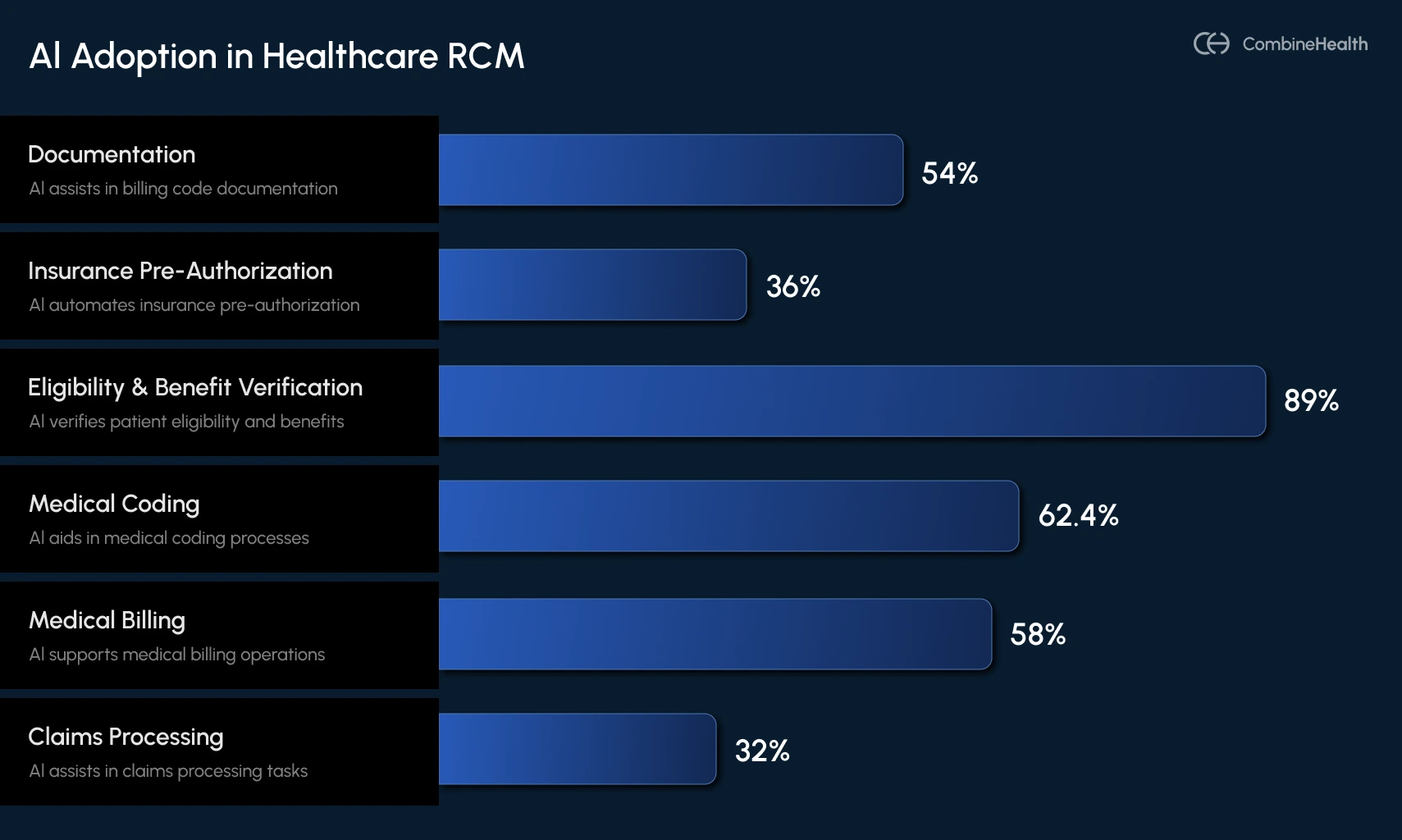
Until 2023, AI in revenue cycle management felt experimental for most hospitals. That shifted dramatically in 2024, as adoption grew and providers and RCM leaders began to see obvious benefits from AI deployments across various RCM functions.
An AMA survey reports that 8% of physicians saw clear benefits from AI in patient care, and AI usage in healthcare operations nearly doubled year over year. This means hospitals are now moving from curiosity to implementation, using AI to automate the high-volume, error-prone workflows that drain staff time and slow cash flow.
Below is a breakdown of AI adoption in hospitals during 2023 and 2024, segregated by different RCM functions:
Real-World Use-Cases of Revenue Cycle Management Automation
Below are some real-world use cases of artificial intelligence in revenue cycle management, from the eyes and brains of CombineHealth’s team of engineers:
AI Medical Coding in the Emergency Department
Medical coding in the emergency department is notoriously challenging because:
- Care is overwhelmingly acute, not chronic
- E/M complexity depends heavily on cognitive effort that may not be explicitly documented
- Trauma rules, imaging interpretation, and chronic conditions influencing acute care must be captured
- Documentation is often incomplete or ambiguous due to ED time pressures
So, when implementing AI in the ED coding workflows for this customer, we made sure our AI picked up on different nuances like:
- What actually happened during this encounter
- What resources were used
- What conditions or symptoms justify those charges
Pratyush, one of the AI engineers working with our ED customer, shares how the ED automation works in two critical pieces of the coding workflow:
1. Generating Billable Codes (CPT/HCPCS)
This involves representing the effort, procedures, services, and resources used in patient care.
CombineHealth’s Amy (the AI Medical Coding Agent used in this application) first identifies which parts of the documentation reflect true patient care delivered during this encounter by evaluating:
- Provider-authored notes
- Procedures performed
- Facility resources used
- Tests ordered and interpreted
2. Generating Non-Billable Codes (ICD-10)
These codes are meant to tell the clinical story that justifies those charges. Once billable codes are identified, Amy moves to ICD-10 coding—the clinical narrative payors rely on to validate medical necessity.
Pratyush explained it this way:
.webp)
Here, Amy begins from first principles:
- What symptoms did the patient present with?
- What acute issues required intervention?
- Which chronic conditions complicated care?
After generating ICD codes, Amy performs a second pass: Does each CPT procedure have justification within the ICD set?
If something doesn’t line up, Amy retries the mapping or flags it for human review, mirroring how expert medical coders work.
Example:
If documentation mentions “dark emesis” but not “hematemesis,” Amy cannot assume they are the same, even though they usually are.
This is the type of ambiguity that leads Amy to escalate for human review, preserving compliance and protecting revenue.
Here are different ambiguities Amy typically flags:
- Symptoms hinted at but not explicitly named
- Procedures performed without a clear rationale
- Conditions implied but not documented
- Conflicting inputs from multiple note authors

Claims Processing for a Dermatology Customer
For many specialty clinics, claims processing becomes overwhelming as backlogs pile up and aging claims lose visibility.
This customer that our head of engineering team Mohit was working with had a long queue of claims stuck in various stages—pending, submitted but unupdated, or simply never reviewed due to volume. They needed a system that could both clear the historical backlog and automate claims processing going forward.
CombineHealth’s Mark (our AI Medical Billing Agent used for this application) automates claims processing for this customer across two major workflows:
1. Payment Posting: Automatically Identifying and Closing Paid Claims
The first step is determining which claims were actually paid.
To do this, Mark was configured to:
- Retrieve the claim directly from the payor portal
- Detect whether the status is Paid, Pending, Acknowledged, Denied, or Underpaid
- Download the EOB for paid claims
- Extract all financial information, including billed amount, contractual adjustments, patient responsibility, date of payment, etc
- Break down payment data at a line level for each CPT code
- Upload the results back into the clinic’s ModMed system
- Notify the clinic so they can verify and close the claim
As a result, what used to take days is now handled automatically, and that too accurately, at scale.
.webp)
2. Analysis of ‘Denied’ or ‘Not-Paid’ Cases
For cases where the status is Denied or Not Paid, Mark performs a deeper analysis by:
- Reviewing denial information
- Determining the cause of denial
- Checking whether incorrect modifiers, missing documents, or other workflow issues were involved
- Building a claim timeline, showing all previous submissions and payor responses
- Generating a clear next-step recommendation for each claim
.webp)
For some claims, the payor portal may show incomplete or ambiguous information.
In these cases, the workflow seamlessly escalates to CombineHealth's Adam (our AI A/R Follow-up Agent), who calls the payor to:
- Retrieve the missing status
- Understand the true denial reason
- Clarify documentation needs
- Get guidance on whether the case is appealable
- Obtain reference numbers or claim notes
Denial Analytics for a 30+ Provider Health Center
Managing denials at scale is one of the most resource-intensive parts of revenue cycle operations. For this 30+ provider group seeing 100–200 patients a day, each weekly or bi-monthly payor cheque represented hundreds of encounters bundled together.
They had been using Cerner’s EHR system and a small army of analysts who manually parsed through reams of EOBs. But as volume grew, cracks began to show. They were finding it difficult to figure out:
- What was paid
- What was denied
- What was causing the denial
Ashutosh, one of our engineers working closely with this customer, explains that denial analytics fundamentally revolves around three steps:
1. Identifying Paid vs. Denied Claims at Scale
Whenever a payor sends a payment cheque, they also send an EOB (Explanation of Benefits), which lists:
- Patient name
- Date of service
- Rendering provider
- Procedures billed
- Amounts paid
- Amounts denied
- Denial codes (in payor-specific formats)
Across thousands of EOBs and inconsistent formatting, manually sifting through each EOB line-by-line created issues like:
- Missed entries
- Paid claims incorrectly tagged as denied
- Denied claims incorrectly marked as paid
- Large mismatches between revenue received and expected payments
.webp)
Ashutosh automated this entire process by helping them build a live, comprehensive denial analytics dashboard, so their team can extract all claim-level decisions and classify them as ‘Paid’ or ‘Denied’ with high accuracy.
2. Mapping payor-Specific Denial Codes to Standard CARC Codes
Every payor uses different naming conventions and logic for denial codes. A coding issue for payor A might be labeled a filing issue by payor B.
CombineHealth solves this through automated CARC code generation. Our AI Denial Analytics Agent Taylor converts each payor’s denial code into a standard CARC (Claim Adjustment Reason Code) that the RCM team already understands. This means analysts no longer need to memorize or interpret 20+ payor-specific rule sets—every denial is mapped to a universal language.
Ashutosh describes this as one of the biggest time-savers for the customer:
.webp)
3. Assigning the Correct Denial Reason with Proper Classification
Once CARCs are generated, the system determines the correct reason for each denial.
Previously, the customer relied on Cerner’s built-in classification system, which was only 51% accurate. This caused issues, such as:
- Paid cases mislabeled as denied
- Denied cases counted as paid
- Incorrect denial categories
- Revenue leakage and wasted operational effort
Ashutosh re-ran 92 of the customer’s hardest cases, including documents with messy layouts, missing fields, or unclear payor formatting, and delivered accurate classification across the board.
Eligibility Check for a Primary Care Customer
For a primary care customer with four clinics and 70–100 appointments a day, the challenge was determining whether each patient’s insurance was active, in-network, and covered for the type of appointments being scheduled.
Mohit, one of our engineers working on eligibility automation, explains that this workflow has several moving parts, especially in specialties like dermatology, where appointments vary widely in complexity.
He worked on automating this end-to-end process using Mark AI across three major workflows:
1. Determining Whether the Patient Is In-Network
Before any insurance benefits can be calculated, the system establishes whether the patient's insurance is accepted at the clinic or with a specific provider.
In dermatology, this becomes especially important because:
- Patients are typically referred, not walk-ins
- Each clinic maintains doctor-specific and clinic-specific network rules
- Every payor contract defines which insurance plans the provider can bill
If the plan is out-of-network, Mark flags it immediately so the clinic can inform the patient before the visit—a critical step for transparency and preventing surprise billing.
2. Extracting Benefits and Calculating Financial Responsibility
Once network status is confirmed, Mark retrieves the patient’s benefits by connecting to payor portals such as Availity or TriZetto. These benefits include:
- Co-pay
- Deductible
- Co-insurance
- Out-of-pocket maximums
- Remaining deductible/out-of-pocket amounts
Mark then applies specialty-specific and appointment-type rules to determine which benefit values apply. Providers typically receive a long, exhaustive list of benefits from payors; Mark narrows them down to the correct values based on:
- Network configuration
- Appointment type (return visit, excision, Mohs surgery, etc.)
- Procedure-specific coverage requirements
For each appointment type, there are predictable CPT codes. Mark uses these to generate an expected patient cost for the visit (based on deductible or co-pay rules) and sends this to the patient before the appointment.
3. Detecting Cases That Require Pre-Authorization
Some dermatology procedures require pre-authorization before the visit. This is especially applicable for high-cost dermatology procedures (e.g., excisions, Mohs surgery), where missing pre-authorization can lead to total claim denial.
While Mark currently flags these cases for human review, the system is designed to:
- Detect when pre-auth is required
- Check if pre-auth was already obtained
- Auto-generate pre-auth or referral requests through payor portals
A/R Follow-up to Accelerate Reimbursement
A/R follow-up is one of the most time-consuming and expensive workflows in revenue cycle management. For this particular customer, the challenge was clear: they had over 1,100 aging claims where the status was unknown.
Some may have been paid, some denied, and some still in processing, but the team had no reliable way to tell which was which.
Ashutosh, one of the engineers working on A/R automation, explains that solving this problem required automating these workflows using Adam AI (CombineHealth’s A/R follow-up AI Agent):
1. Retrieving Claim Status from payor & Clearinghouse Portals
Each payor (Aetna, Medicaid, UHC, and others) maintains its own portal where claim statuses are updated after clearinghouses sweep payment data.
When checking claim status, a biller typically:
- Logs into multiple portals
- Searches for each claim manually
- Downloads or reviews status lines
- Reconciles anything that doesn’t match the EHR
But, for 1,100 outstanding claims, this becomes unmanageable.
CombineHealth’s Adam AI goes into payor and clearinghouse portals (like Availity), searches each claim, and extracts key information: Paid, Denied, In Progress, or Status Not Found.
If the status is found, the claim moves into the next workflow.
If not found, it is automatically routed to Adam, our AI A/R Follow-up Agent, for calling.
2. Calling Payors When Status Is Missing or Unclear
When portals don’t have updated information (which happens very commonly), Adam initiates phone calls to obtain the status directly from the payor. Ashutosh shared the complexities that make human A/R calling so inefficient:
- Every payor has a different IVR system
- IVRs can require speech response or keypad navigation
- Many payors provide status through IVR, but others route to human agents
- Medicaid and Medicare calls can have 10–20 minute hold times
- A single claim status call averages 10 minutes of human time
Adam handles all of this automatically, which helps eliminate hours of manual and repetitive work for the customer.
3. Handling Denied Claims & Preparing for Appeals
If a claim is confirmed as denied, Adam performs a second type of call: identifying why it was denied and what is required to fix it.
.webp)
During these calls, Adam gathers info like:
- The denial reason
- Missing documentation, if any
- Whether the denial is appealable
- What the payor needs for resubmission
- Filing limits or next steps
Once the denial reason is confirmed, the claim moves into the denial-handling pipeline, where Rachel (our AI Appeals Agent) takes over to prepare payor-specific appeal letters.
How These Workflows Come Together as an End-to-End AI RCM Platform
Individually, each workflow covered in this guide—coding, eligibility checks, denial analytics, claims processing, and A/R follow-up—solves a specific operational problem. But the real impact comes from how these workflows connect.
That’s why CombineHealth approaches RCM automation as a system, not point solutions. Each AI agent is designed to develop deep expertise in a specific function, while sharing context across the revenue cycle.
The result is a platform where automation doesn’t create new silos, but helps make upstream decisions inform downstream actions.
Ready to Bring This Level of Efficiency to Your RCM?
As our engineers’ insights show, AI is already reshaping some of the most labor-intensive parts of RCM.
If you're exploring how these same workflows could work inside your organization, our team would be happy to walk you through it.
Book a demo with CombineHealth!
FAQs
What is RCM AI?
RCM AI uses machine learning, NLP, and automation to streamline healthcare revenue cycle tasks like coding, claims scrubbing, denial prediction, and appeals. It cuts manual errors, boosts clean claim rates to 95%+, reduces denials by 20-50%, and accelerates reimbursements.
How is AI used in medical billing?
AI automates medical billing by using NLP to extract data from records, assign accurate CPT/ICD codes, validate eligibility, scrub claims for errors, predict denials, and streamline submissions/appeals. It reduces errors, speeds reimbursements, cuts denials, and lowers costs
How AI reduces claim denials in RCM?
AI reduces claim denials in RCM by identifying documentation gaps early, applying payer-specific coding rules, validating eligibility and modifiers, and catching errors before submission. It also analyzes denial patterns, standardizes denial reasons, and guides timely follow-ups or appeals—preventing repeat mistakes and improving first-pass claim acceptance.
What are the ROI metrics for AI in revenue cycle management?
ROI for AI in revenue cycle management is typically measured across financial, operational, and quality outcomes, including:
- Reduction in claim denials (often 20–50%+)
- Faster A/R turnaround (15–30% fewer A/R days)
- Higher net collections from accurate coding and timely follow-ups
- Lower cost to collect by reducing manual effort and rework
- Productivity gains (hours saved per coder, biller, or analyst)
- Improved first-pass claim acceptance rates
How to measure AI impact on first pass acceptance rate?
To measure AI’s impact on the first-pass acceptance rate, compare pre- and post-AI baselines for clean claim submissions. Track the percentage of claims paid on first submission without edits or denials, segmented by payer and specialty. Pair this with denial reason analysis to confirm reductions in preventable, coding- or eligibility-related rejections.
Which denial root causes should AI prioritize first?
AI should prioritize denial root causes that are high-volume, preventable, and repeatable. The most impactful starting points are eligibility and coverage errors, coding and modifier mistakes, missing or insufficient documentation, timely filing issues, and authorization or referral gaps. Focusing on these areas delivers faster denial reduction and stronger financial returns.
Recommended Reads







Explore Our
AI Workforce






Subscribe to newsletter - The RCM Pulse
Trusted by 200+ experts. Subscribe for curated AI and RCM insights delivered to your inbox

Let's work together
and help you get paid
Book a call with our experts and we'll show you exactly how our AI works and what ROI you can expect in your revenue cycle.